Showing posts with label Nik Silver Efex Pro. Show all posts

Monday, May 30, 2011

Coke and a smile... Nik Silver Efex Pro 2 Creativity Tip...


Have a Coke and smile! An actual Coke is hard to find in Cuba, Tu-cola is very popular and is a great alternative! I think this guy found the real thing. Nik Silver Efex Pro 2 is my favorite black and white conversion software because of how beautifully it works with both my color and infrared photos. This image was converted to black and white with Nik Silver, and the opacity of the filter layer was reduced to about 85% revealing some of the overall color for an old photo vintage look.

If you want to learn more about Nik Silver Efex Pro, I highly recommend Dr. Jason Odell's A Photographers Guide to Nik Silver Efex Pro 2. Both the guidebook and companion videos are very well designed and illustrated so that the photographer from the novice to professional will benefit. I've been recommending Odell's guide to my students who want to explore Nik Silver Efex Pro 2 more in depth. This is an excellent guide and resource for the color and infrared photographer who wants to make the most of their black and white imagery. Odell covers all the new features of Nik Silver Efex Pro 2 including the new sliders for Global Tone and Contrast, Structure/Fine Structure, Color Toning, the new History Browser, down to creative touches like selective coloring and edge treatments. Odell's instructions are clear, concise, and to the point, making this an invaluable guide for the black and white photographer. Highly recommended!

You can use the promo code DSANDIDGE for everything Nik. Have fun shooting! ~ Deb

Monday, May 23, 2011

On the Road - Classic car in B&W with a little texture...

Cuba is full of vintage cars aged to perfection. I feel like I'm in a time warp when in Cuba, seeing so many old American cars on the road. Recently Raul Castro announced that potential car ownership may change for Cubans, opening up the new ability to buy and sell cars, and obtain new ones. How this will effect the charm of Cuba with all the wonderful vintage cars? I hope they will at least maintain their positions of taxi's, I would miss seeing the character of all these classic cars on the road!

This car was photographed as it rounded the Malecon, Cuba's waterfront. It seemed the perfect subject for a black and white photograph. I added a layer of texture to give the photo a worn and vintage look. Black and white photography allows the viewer to take in all the qualities of a subject without the connotations of color. Light, shadow, texture, pattern, and tonality become more important.

Nik Silver Efex Pro 2 is my favorite black and white conversion method. The latest version has quite a few new features including dynamic brightness, structure and fine structure, amplify blacks and whites, selective color, and even a few borders. I absolutely love it with my infrared photography!  Have fun in the digital darkroom! ~ Deb

(Reposting lost post from previous Blogger issues, sorry for the lost comments)!

Wednesday, May 18, 2011

Create a dramatic image by adding a texture layer...

One of my favorite ways  to add drama, depth and definition to a photo is to add a texture layer to the original image. A texture layer can be as simple as another photograph that you have taken, clouds, aged peeling painted walls, flowers, granite, anything goes. I like to photograph textures everywhere I go and keep them handy for creative work. The examples in this blog post have the same cloud texture so you can see how different the clouds look with a variety of photos. This is really fun to do!

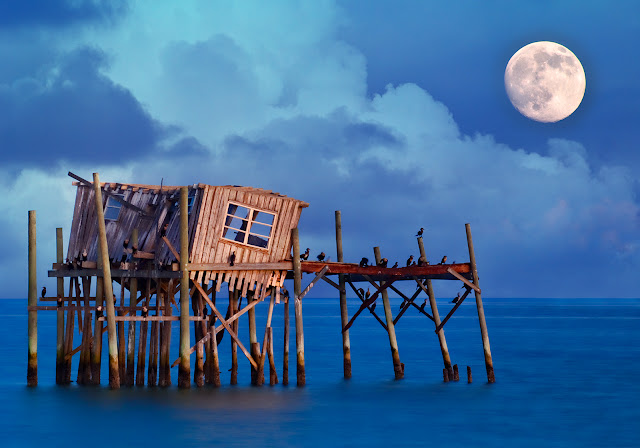
The first example started with an in-camera double exposure taken with my Nikon D3s in Cedar Key, Florida of an old fishing shack and the moon. There were no clouds in sight the evening I was shooting, so I added one of my favorite cloud textures later in Photoshop. 

Layering is very easy... 
  • Cmd/Ctrl A to select the texture layer. 
  • Cmd/Ctrl C to copy it.  
  • Cmd/Ctrl V to paste into the background document (your original image). 
  • Choose a Blend Mode to layer the two images together, such as Overlay or Multiply.
  • Tip - Hold down the Shift key and press the plus/minus key to scroll through blend modes. 
You can also drag the cloud layer over to your background layer, holding down the shift key to align the texture layer with your original image. I used the Transform tool to vary the clouds slightly in each of the photographs. Don't hesitate to modify a texture layer to suit your image. You can also rotate or flip your texture layer, alter the hue and saturation or convert it to black and white, adjust the opacity, anything goes!

The same clouds added a cinematic touch to this photograph taken in St. Augustine. One of the colorful filters in Nik Color Efex Pro accentuated the gold tones throughout the image. The same clouds were added to the landscape image below which creates a pastel look in a previously empty sky.

For fun, I added the same layer of clouds to create a stormy sky look to the airplane image below. The image was converted to black and white with Nik Silver Efex Pro 2. The clouds here look very dramatic having more contrast compared to the landscape example. To give you an idea of what you might photograph to create your own textures, I've included a few screenshots at the end of this post. You can also start your collection right way by using my favorite Flypaper Textures. I also cover textures in the classes I teach at BetterPhoto.com, both Enhancing Images and also Infrared Photography. Hope you can join me next month. Classes start June 8th, I hope to see you there! Make great pictures... ~ Deb  


Monday, April 11, 2011

Cemetery in Cienfuegos, Infrared with Nik Silver Efex Pro 2...

I just returned from a two week visit to Cuba. one of my favorite places on the planet thus far! Cuba has several cemeteries with the most wonderful angel statues. I like the gentle waves of clouds in the background that seem to frame the angels. I photographed this scene in infrared which is one of my photographic passions!

Black and white infrared creates a traditional look that has timeless appeal.  My favorite software for black and white conversion is Nik Silver Efex Pro 2,  as it provides many options for fine tuning images.  Infrared photography, and Nik Silver Efex Pro 2 are a perfect fit. Black and white allows a photographic story to be told in a unique way, without the connotations of color. Light, shadow, texture and tonality become more important in the composition, and infrared adds to the surreal quality.

Interested in infrared? Please check out my book available at bookstores or Amazon, Digital Infrared Photography, published by Wiley. If you would like to try a beautiful way to convert your images to black and white, download a trial version of Nik Silver Efex Pro 2, DSANDIDGE is your promo code for everything Nik! Have fun shooting! ~ Deb

Thursday, February 17, 2011

B&W and More with Nik HDR Efex Pro..


Here's an HDR image processed to look more like a B&W photograph rather than on the illustrative side. I couldn't help but use a fisheye lens for a fun look! I have an artistic background, and tend to work in that direction. My buddy, an architectural photographer wouldn't dream of this! It's a tilt shift perspective control lens all the way. That's the great part about HDR, you are the photographer, and decide how to portray/process your images, photorealistic, or illustrative/artistic, or somewhere in between. The subject will help guide you on which direction to take, and it's great to try out different ideas. The presets in Nik HDR Efex Pro are perfect for this. Experiment, have fun!

For high contrast scenes, you may need more than three exposures to capture the entire dynamic range as with the Time Square photo above.

Tips for shooting HDR images.

  • Tripod, cable release, three axis bubble level
  • Lowest ISO
  • Aperture priority or manual (keep the aperture constant)
  • Auto-bracket, or bracket manually 
  • Raw format for best results
  • Lock focus (helpful in low light situations)
  • Double check the histogram 

Generally, you are shooting 0, -2,  +2, and more exposures if needed. For handheld HDR images, try to brace yourself and use auto-bracking. When merging handheld HDR images, use Alignment (I keep it checked). The Ghost Reduction Method works with anything moving in the scene, check this box for trees on a windy day (Adaptive), or Global for anything large moving through your composition.

The most enjoyable part of HDR is working with the images in Nik HDR Efex Pro. Thank you very much to those who listened in on my Nik HDR Efex Pro Webinar yesterday! I enjoyed sharing a few photos and ideas about working with HDR Efex Pro, plus a few finishing touches in Viveza and Color Efex Pro as well.

For the webinar, the images were converted from Raw (the format recommended to shoot in) and Jpegs were used for purposes of demonstration. This allowed us to move quickly through photos over the internet. Nik HDR Efex Pro did a fine job working with the limited resources of Jpegs! However, you'll get the best results by shooting in Raw.

You can download a trial version, and if you like how it works for you, please feel free to use coupon code DSANDIDGE for anything Nik Software. Don't forget the BetterPhoto promo code NIKFRIENDS for $20 off a BetterPhoto course. Make great pictures! ~Deb

Friday, February 11, 2011

Broaden your photographic horizons, shoot infrared!

Your imagination is your preview of life's coming attractions. ~Albert Einstein

Infrared photography can give you a new outlet for artistic expression by allowing you to shoot traditional subjects in novel and interesting ways. A color photograph converted to black and white is quite different from a black and white infrared image. Nothing can quite compare with the surreal factor of bright white foliage, a dark sky and the uniqueness of how infrared light is reflected and absorbed by different surfaces. Infrared photography is a wonderful way to broaden your photographic horizons and expand your creativity!

Interested in learning more? Please check out my book Digital Infrared Photography published by Wiley, available at bookstores and online at Amazon. I also teach Infrared Photography at BetterPhoto.com. I'll be speaking about infrared in April at Florida's Birding and Photo Fest, and in June in Ontario for the Canadian Camera Conference. I hope to see you at one of these events!

My favorite method of black and white conversion is Nik Silver Efex Pro. It creates beautiful black and white images that are perfect for both infrared and color photography. For museum quality black and white printing, try Digital Silver Imaging. Make great pictures! ~ Deb

Tuesday, February 8, 2011

Black and White, or Color? HDR in Downtown Orlando...

Black and white photography has a timeless appeal that can create an emotional response that's different from color. Light, shadow, pattern, texture, and tonality work beautifully together to create an expressive image independent from the connotations color. Black and white can romanticize an image, look at the wonderful work of wedding photographers! Much of the appeal for me started with film photography, and making my own prints, messy but a lot of fun! This was taken in downtown Orlando at twilight as a three shot HDR merged in HDR Efex Pro. The image was converted to black and white with Nik Silver Efex Pro which can create an elegant traditional film look. Try it and see! You can use my coupon code for a discount for everything Nik! Have fun in the digital darkroom! ~ Deb

Thursday, January 27, 2011

Stroll in the National Museum of Rome...


The National Museum is a wonderful place to visit in Rome. There is much to explore! I liked the woman admiring the artifacts, and it seemed the perfect opportunity to create a black and white interpretation. Black and white imagery has a timeless appeal, and classic traditional look. Converting to B&W can create a more dramatic and expressive image, without the connotations of color. This allows the viewer to take in the wonderful texture, pattern, shape, light, shadow and tonality throughout the image.


Nik Silver Efex Pro is my favorite method of B&W conversion. I use it for my all my infrared photography, and it works perfectly for color images as well. For black and white printing, please check out Digital Silver Imaging. I saw their stunning prints at PDN PhotoPlus Expo in New York. They do beautiful work, and they also convert cameras to infrared! You can use this Deb-IR for infrared camera conversion, and DSANDIDGE for everything Nik. Have fun shooting! ~ Deb

Thursday, November 18, 2010

#HDR Times Square at night - fun with a fisheye...


I'm a big fan of the super wide view one gets by using a fisheye lens. This scene was photographed with a Nikon 16mm fisheye lens, which by tilting, created the distortion of the architecture. This lens pulls everything together in an interesting way. Technically, if the lens is held level, you get an ultra-wide view without the bendy look. Perfection can be obtained with a tilt shift lens, but this is kind of fun, don't you think? I'd like to go back and photograph this scene with a tilt shift lens just to be able to create a different look, on my list for next time!

Another way to create a different look is to convert an image to black and white. This changes the dynamics a bit. Instead of color, other elements in the composition become more important such as texture, pattern, light, shadow and contrast. Black and white has a nostalgic and timeless look, think Ansel Adams. I used Nik Silver Efex Pro to convert this image to black and white. However, if you want to have a little more fun, add a layer mask and brush back in some of the color in the image. This has a lot of impact if you have a singular subject to "color" in the composition, but it works well for general eye popping results too!


If you want to go for complete vintage, try a sepia look. You can do this right in Nik Silver Efex Pro using one of the Stylizing Toning presets. This is also super simple to do in Photoshop. Create a Hue Saturation adjustment layer. Check Colorize, and change the Saturation to 12 and the Hue to 36. Play with those numbers to suit your image. This Times Square photo is an HDR image created with Nik HDR Efex Pro, which allowed detail to be retained in both the highlight and shadows areas of this very high contrast composition. Can't wait to get back to NYC! ~ Deb

Thursday, October 21, 2010

Before/After with Nik Silver Efex Pro - Create nostalgic black & white photos...


As much as I love color photos, black and white holds a timeless appeal. I have a romantic notion about black and white, having started photography by developing film, and making my own prints. There is something very classic and traditional about black and white. With the connotations of color removed, the strength of the photograph relies on other factors. With black and white imagery, light, shadow, contrast, textures, patterns all become more important. Converting an image to black and white allows the foundation of a photograph to become very clear and more meaningful, telling a different story.

One of my favorite techniques for converting photos to black and white is with Nik Silver Efex Pro. Mouse over the image above to see the color version. In black and white, it looks as if it could have been taken long ago, creating a nostalgic look. I like the color version, it's fun and reflects Cuba as it is now, (although it's virtually unchanged including the cars). Portraying the scene with the vintage appeal of black and white just seems to fit.  

Tip - Create a faded color vintage look by reducing the opacity of the filter layer. You can use DSANDIDGE as your coupon code for anything Nik. Make great pictures!